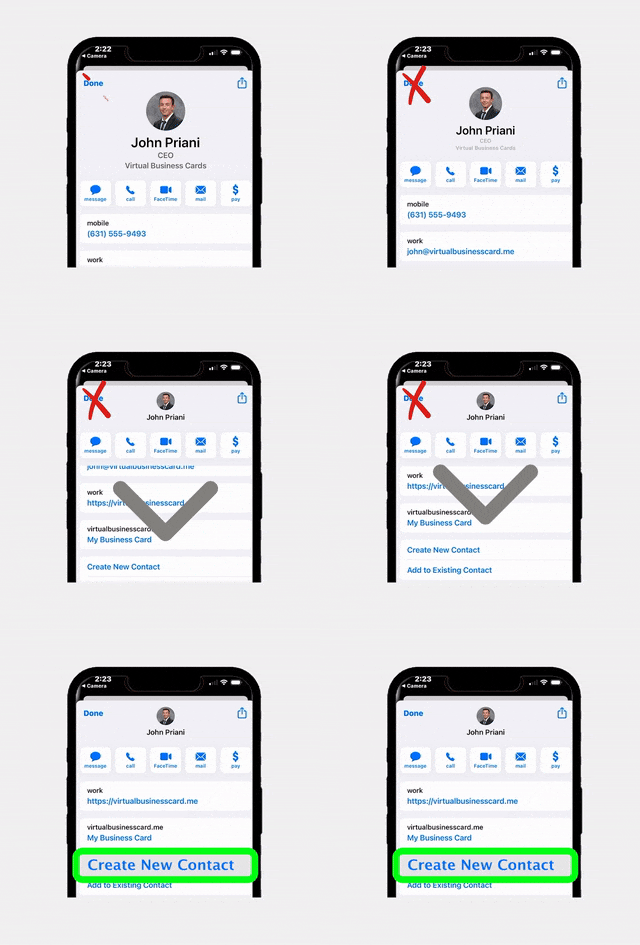
In real estate, the agents who consistently win repeat and referral business are the ones who stay top of mind with the people who already know, like, and trust them. Your past clients and sphere of influence represent the most valuable segment of your potential pipeline, yet most agents lose touch within months of closing. RealConnect, the digital business card platform built specifically for real estate professionals, gives you a modern, shareable, and trackable way to maintain those critical relationships long after the transaction ends.
Why Staying Top of Mind Matters in Real Estate
According to the National Association of Realtors, 73% of buyers and sellers say they would use their previous agent again, but only 25% actually do. The disconnect is not about dissatisfaction. It is about forgetfulness. Life moves fast, and when someone in your past client’s circle mentions they need an agent two years later, your name simply does not come up because you have not maintained a presence in their world.
Your sphere of influence, the friends, family members, neighbors, former colleagues, and community connections who know you personally, is equally powerful. These individuals are your unpaid marketing team, but only if they remember what you do and feel comfortable recommending you. A single referral from a trusted friend carries more weight than dozens of cold leads from online advertising.
The math is compelling. Nurturing existing relationships costs a fraction of what it takes to acquire brand-new leads. When you stay top of mind, you create a self-sustaining referral engine that compounds year after year. The challenge has always been finding an easy, scalable, and non-intrusive way to do it. That is exactly where digital business cards come in.
What Is RealConnect and Why It Works for Relationship Building
RealConnect is a digital business card platform designed from the ground up for real estate professionals. Unlike a traditional paper card that gets tossed in a drawer or thrown away, a RealConnect card lives on your contact’s phone, is always up to date, and gives recipients a reason to engage with you repeatedly.
Here is what makes RealConnect different from generic digital card tools:
- Real estate-specific design – Templates and fields are tailored to how agents actually work, including brokerage branding, license information, active listing links, and review profiles.
- One-tap sharing – Share your card via text message, email, QR code, social media, or even NFC tap. No app download is required for the recipient.
- Always current – Change brokerages, update your headshot, or add a new phone number and every person who has your card sees the update instantly.
- Engagement tracking – See who viewed your card, when they viewed it, and which links they clicked, giving you real-time buying signals from your network.
Think of RealConnect as a living, breathing extension of your personal brand that sits right in the contact list of every person you have ever met professionally. It is not a one-time handoff. It is an ongoing connection point.
Building a RealConnect Card That Makes a Lasting Impression
Before you start sharing your card with past clients and your sphere, you need to make sure the card itself is optimized to represent you well. A generic card with just your name and number will not inspire anyone to save it or share it with friends. Here is how to build a card that people actually want to keep.
Start with a Professional Photo
Your headshot is the first thing people see. Use a high-quality, recent photo with good lighting and a clean background. Avoid overly casual snapshots or photos that are more than two years old. People want to recognize you when they see you in person.
Craft a Compelling Tagline
Below your name, include a short tagline that communicates your value proposition. Instead of just “Realtor at XYZ Brokerage,” try something like “Helping first-time buyers find their perfect home in Austin” or “Your neighborhood expert in North Dallas since 2015.” Specificity builds trust and makes you memorable.
Include the Right Links
Your RealConnect card can include multiple clickable links. Choose them strategically:
- Your review profile – Link to your Google Business Profile or Zillow reviews so prospects can see social proof.
- Active listings page – Give people a reason to check back regularly by linking to your current listings.
- A scheduling link – Make it effortless for someone to book a call or coffee meeting with you.
- Social media profiles – Connect on Instagram, Facebook, or LinkedIn to create multiple touchpoints.
- A homeowner resource – Link to a home valuation tool or a blog post about market trends to provide ongoing value.
Add Your Brokerage Branding
Consistent branding builds recognition. Include your brokerage logo, brand colors, and any team branding elements. RealConnect makes it easy to keep everything on-brand while still showcasing your individual personality.
Proven Strategies for Sharing RealConnect with Past Clients
Getting your digital card into the hands of past clients is only the first step. The real magic happens when you create a system for regular, value-driven touchpoints that keep you visible without being annoying. Here are specific strategies that work.
The Post-Closing Card Share
The best time to share your RealConnect card is right after closing, while the positive feelings are still fresh. Send a personalized thank-you text that includes your card link. Something like: “It was such a pleasure working with you on this journey! Here is my digital card so you always have my info handy. If anyone you know ever needs real estate help, I would love the referral.” This plants the seed for future referrals at the moment when client satisfaction is highest.
The Home Anniversary Check-In
Set a reminder for each client’s purchase anniversary. Send a quick message: “Happy one-year home anniversary! Hope you are loving the place. By the way, I recently updated my digital card with some great homeowner resources. Here is the link if you want to save it.” This re-shares your card naturally while celebrating a meaningful milestone.
The Market Update Touch
When notable market shifts happen in your area, use them as an excuse to reach out. “Hey, home values in your neighborhood are up 8% this year. Thought you would want to know! Feel free to share my card with anyone who might be thinking about making a move.” You are providing value and reminding them you are the local expert.
The Seasonal Pop-By Upgrade
Many agents do seasonal pop-bys with small gifts. Add a digital twist by including a QR code linked to your RealConnect card on a small printed tag. “Scan for my latest listings and market updates!” This bridges the physical and digital worlds beautifully.
The Review Request Opportunity
When you reach out to ask for a review (which you should be doing regularly), include your RealConnect card link in the message. It serves double duty: you get the review and you re-establish your digital presence in their phone.
Growing Your Sphere of Influence with Digital Business Cards
Your sphere of influence extends far beyond past clients. It includes friends, family, neighbors, people you meet at community events, parents at your kids’ school, fellow gym members, and anyone else who knows you personally. The challenge is making sure all of these people know you are in real estate and can easily access your contact information when the moment arises.
Make Sharing a Habit, Not an Event
The biggest mistake agents make is treating their sphere of influence as a static list. In reality, you are meeting new people all the time. Train yourself to share your RealConnect card whenever a natural opportunity presents itself. After a good conversation at a neighborhood barbecue, after meeting someone at a charity event, or after connecting with a new parent at school pickup, simply say, “Let me send you my digital card so we can stay in touch.”
Leverage Social Media
Add your RealConnect card link to your social media bios on Instagram, Facebook, LinkedIn, and anywhere else you have a presence. When you post content about real estate, include a call to action: “Save my digital business card for when you or someone you know needs real estate help.” According to Inman News, agents who maintain an active social media presence generate significantly more referral business than those who do not.
Use It in Your Email Signature
Replace (or supplement) your traditional email signature block with a link to your RealConnect card. Every email you send, whether it is about real estate or not, becomes a subtle reminder that you are a real estate professional. Over the course of a year, you send hundreds or even thousands of emails. That is hundreds of micro-impressions.
Network at Community Events
Community involvement is one of the best ways to grow your sphere. Volunteer at local events, sponsor a little league team, or host a neighborhood gathering. At each of these touchpoints, share your RealConnect card digitally instead of fumbling with paper cards. It is faster, more professional, and infinitely more memorable.
Create a Referral Incentive
Consider creating a simple referral program and promoting it through your RealConnect card. Add a link to a referral landing page where people can submit the names of friends or family who might need real estate help. When someone sends you a referral that converts, send a thoughtful thank-you gift along with a fresh share of your card.
Tracking Engagement and Following Up at the Right Time
One of the most powerful features of RealConnect is the ability to see who is engaging with your card and when. This transforms your follow-up from guesswork into a data-driven strategy that helps you stay top of mind with the people most likely to transact.
Understanding Engagement Signals
When a past client or sphere member views your card, clicks on your listings link, or taps your phone number, these are buying signals. They may not be ready to call you today, but they are thinking about real estate. Here is how to interpret common engagement patterns:
- Multiple views in a short period – This person is likely researching. They may be thinking about selling, buying, or referring someone. Reach out casually.
- Clicked on your listings link – They are browsing homes. This could mean they are considering a move or helping a friend look.
- Shared your card with someone else – This is the holy grail. Someone just referred you. Follow up immediately with a thank-you and reach out to the new contact.
- Clicked on your scheduling link – They want to talk. Make sure you respond quickly.
Timing Your Follow-Up
The key to effective follow-up is timeliness without pressure. When you see engagement on your card, reach out within 24 to 48 hours with a low-pressure message. Something like: “Hey, I was just thinking about you! How is the house treating you? Let me know if you ever have any real estate questions.” You do not need to mention that you saw them view your card. Just let the engagement trigger the outreach.
Building a Follow-Up System
Create a simple system for acting on engagement data. Check your RealConnect dashboard weekly and categorize contacts into three buckets:
- Hot – Recent, repeated engagement. These people need a personal call or text within 24 hours.
- Warm – Occasional engagement. Add them to your monthly touchpoint rotation.
- Nurture – No recent engagement. Include them in quarterly outreach with a market update or seasonal message.
Integrating RealConnect with Your Overall Marketing Strategy
RealConnect works best when it is not operating in isolation. It should be a central hub in your broader marketing and relationship management ecosystem. Here is how to connect the dots.
Pair with Your CRM
When you capture a new contact through RealConnect, add them to your CRM immediately. Tag them based on how you met (open house, sphere, past client, community event) and set up automated drip campaigns that complement your digital card touchpoints. The combination of CRM automation and personal RealConnect shares creates a powerful one-two punch.
Combine with Open House Lead Capture
If you use EntryPointPro for your open houses, you are already capturing visitor information digitally. After each open house, send attendees a follow-up message that includes your RealConnect card. This ensures they have your permanent contact information saved in a format that is easy to access and share.
Use Alongside Your Offer Management Workflow
When you are working with buyers in a competitive market, professionalism matters at every touchpoint. Sharing your RealConnect card with listing agents and cooperating brokers alongside your offers, especially when using a streamlined tool like RLTRsync Offer Management, projects a polished, tech-savvy image that can set you apart.
Connect to Your Content Marketing
If you create blog posts, market reports, video content, or social media posts, use your RealConnect card as the call to action. Instead of saying “call me for more info,” say “save my digital card for instant access to my listings, reviews, and contact info.” This is a softer ask that delivers more value and creates an ongoing connection rather than a single interaction.
Leverage for Referral Partners
Real estate agents work closely with lenders, title companies, home inspectors, contractors, and other service providers. Share your RealConnect card with every referral partner you work with. When they encounter someone who needs an agent, forwarding your digital card is as easy as sharing a link. Make it effortless for people to refer you.
Frequently Asked Questions
How often should I share my RealConnect card with past clients?
Aim to reshare or reference your RealConnect card at least three to four times per year with each past client. Tie each share to a value-adding touchpoint such as a home anniversary, a market update, a holiday greeting, or a seasonal homeowner tip. The goal is to stay visible without being overwhelming. Spacing your outreach every 8 to 12 weeks tends to be the sweet spot for maintaining top-of-mind awareness.
Do my contacts need to download an app to view my RealConnect card?
No. One of the biggest advantages of RealConnect is that recipients do not need to download any app. Your digital business card opens directly in their phone’s web browser and can be saved to their contacts with a single tap. This removes all friction from the process and ensures that even your least tech-savvy contacts can easily save and access your information.
Can I use RealConnect if I switch brokerages?
Absolutely. When you change brokerages, simply update your RealConnect card with your new brokerage name, logo, and any other relevant details. The update is reflected instantly for everyone who has your card saved. This means you never have to worry about past clients or sphere members having outdated information, and you do not need to redistribute hundreds of new paper cards.
What is the difference between RealConnect and a regular digital business card app?
RealConnect is purpose-built for real estate professionals, which means it includes features that generic digital card apps do not offer. These include real estate-specific fields like license numbers and brokerage branding, integration with real estate workflows like open house sign-ins through EntryPointPro, and engagement tracking designed to help agents identify buying and selling signals. Generic apps treat every profession the same, while RealConnect is tailored to how agents actually build their business.
How do I measure whether RealConnect is helping me get more referrals?
Track two key metrics over time. First, monitor your card engagement data within the RealConnect dashboard, including views, link clicks, and shares. Second, track the source of every new lead you receive in your CRM. Over a six-month period, you should see an increase in referral leads from contacts who have your RealConnect card saved. Many agents also find it helpful to simply ask new leads, “How did you hear about me?” and note whether the referring party has your digital card.
Start Building Stronger Relationships Today
Your past clients and sphere of influence are your most valuable business assets. RealConnect makes it easy to stay connected, stay visible, and stay top of mind, all from a single digital business card.





 Icon On The Top Right Is the Menu For Your Card. This Is Where You can edit your card and log into your dashboard.