Closing day is the single most emotionally charged moment in any real estate transaction, and it is also the most overlooked opportunity for generating closing day referrals. Your clients are thrilled, grateful, and more likely than ever to recommend you to friends and family. By strategically sharing your RealConnect digital business card at the closing table, you can transform every successful transaction into a referral engine that fuels your business for years to come.
Why Closing Day Is the Ultimate Referral Opportunity
According to the National Association of Realtors’ Profile of Home Buyers and Sellers, 38% of sellers found their agent through a referral from a friend, neighbor, or relative. Referrals remain the number one way real estate agents earn new clients, yet most agents fail to capitalize on the single best moment to plant that referral seed: closing day.
Think about the psychology at play. Your buyer just received the keys to their new home. Your seller just walked away with a check that represents their next chapter. Everyone at the table is feeling a wave of relief, excitement, and goodwill. This emotional peak is what psychologists call a “peak-end moment,” and research shows that people judge an experience largely based on how they felt at the most intense point and at the end. Closing day is both.
When you pair this emotional high with a simple, shareable action, like tapping your digital business card to their phone, you create a memory anchor. Every time they scroll past your contact info or share it with a friend who mentions wanting to buy a home, they will recall that positive closing day feeling and associate it with you.
What Is a RealConnect Digital Business Card
RealConnect is a digital business card platform built specifically for real estate professionals. Unlike generic digital card apps, RealConnect is designed around the unique needs of agents and brokers who need to share their information quickly, professionally, and in a way that sticks.
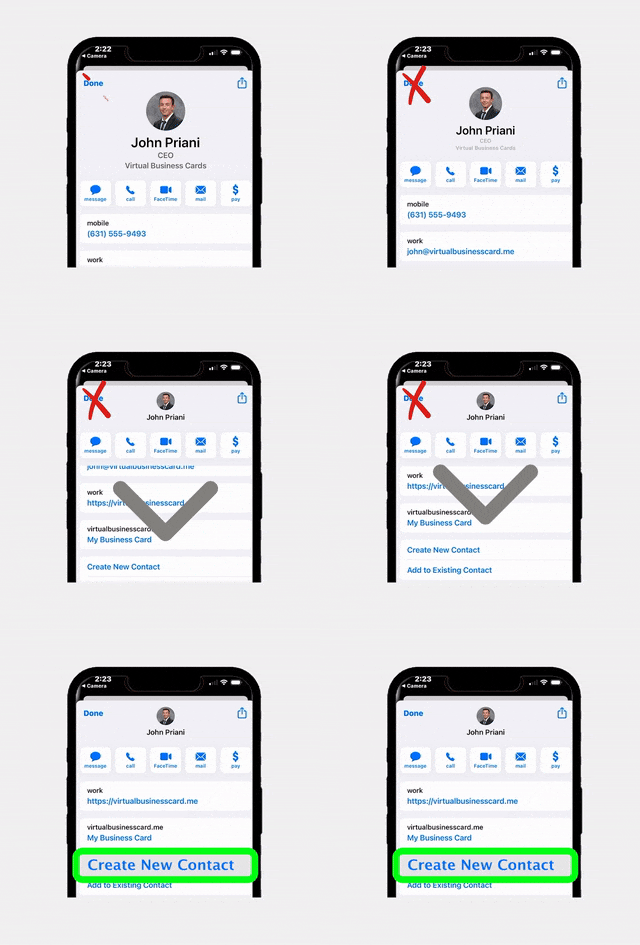
With a RealConnect card, your contact details, headshot, brokerage branding, social media links, and even property listings live on a sleek, mobile-optimized page. You can share it via NFC tap, QR code, text message, email, or a simple link. When a client saves your card to their phone, you are no longer a paper card buried in a junk drawer. You are a digital contact that is always one tap away.
Here is what makes RealConnect particularly powerful for closing day referrals:
- Instant sharing – Tap your NFC-enabled card to any smartphone, and your full profile appears in seconds.
- Easy forwarding – Clients can share your card with friends and family with a single text or tap, removing all friction from the referral process.
- Professional branding – Your card reflects your personal brand and brokerage identity, reinforcing trust every time someone views it.
- Always up to date – Change your phone number, switch brokerages, or update your headshot? Your digital card updates instantly for everyone who has it.
Five Ways to Share Your RealConnect Card at Closing
Sharing your digital business card at the closing table does not have to feel awkward or salesy. The key is to make it feel like a natural extension of your excellent service. Here are five proven methods that top-producing agents use to share their RealConnect card at closing.
1. The NFC Tap at the Table
Before the signing begins, casually mention that you would like to make sure everyone has your contact information saved. Hold your NFC-enabled RealConnect card near each person’s phone. The tap takes less than two seconds, and it often sparks a fun conversation about the technology itself. Title officers, lenders, and the other agent at the table will notice, and many will ask about it, giving you additional networking opportunities.
2. QR Code on Your Closing Folder
If you provide a branded folder with closing documents, include a QR code on the inside cover that links directly to your RealConnect profile. Add a short message like, “Loved working with you! Save my card and share it with anyone who needs a great agent.” This passive approach works well for agents who prefer a softer touch.
3. Text Message Before the Meeting
Send a congratulatory text the morning of closing that includes your RealConnect link. Something like, “Today is the big day! So excited for you. Here is my card in case you ever need anything or know someone who does: [RealConnect link].” This ensures the client has your digital card saved even before they sit down at the table.
4. Share with Everyone in the Room
Closing day often includes the buyer, seller, both agents, a title officer, a lender, and sometimes attorneys or family members. Each person in that room is a potential referral source. Do not limit your sharing to just your client. Offer your card to every professional and guest at the table.
5. Include It in Your Thank-You Message
Within 24 hours of closing, send a heartfelt thank-you email or text that includes your RealConnect link. This is your final impression, and according to the peak-end rule, it matters enormously. A thoughtful message paired with an easy way to share your info sets the stage for long-term referrals.
How to Include Your Digital Card in Closing Day Gifts
Closing gifts are a time-honored tradition in real estate, and they present a perfect opportunity to integrate your RealConnect card in a way that feels generous rather than promotional. The trick is to make the digital card feel like part of the gift experience, not an afterthought.
Custom Gift Tags with QR Codes
Whether you are giving a bottle of wine, a cutting board, or a gift basket, attach a custom gift tag that includes a QR code linking to your RealConnect profile. On the tag, write something personal like, “Congratulations on your new home! It has been a joy working with you. If your friends or family ever need real estate help, I am always just a tap away.”
Welcome Home Kits
Many agents put together welcome home kits with essentials like cleaning supplies, a local restaurant guide, or a small toolkit. Include a printed card inside the kit with your QR code and a brief note encouraging them to save and share your digital card. This positions you as the helpful neighborhood expert, not just the agent who closed the deal.
Digital Closing Gift Packages
For a modern twist, consider sending a digital closing gift alongside your physical one. This could be a curated email that includes a home maintenance checklist, a list of recommended local service providers, and your RealConnect link. According to Inman News, agents who provide ongoing value after closing see significantly higher referral rates than those who disappear after the transaction.
Building a Follow-Up System That Turns Clients into Advocates
Sharing your RealConnect card at closing is just the beginning. The real magic happens in the follow-up. Without a consistent post-closing communication plan, even the most grateful client will forget to refer you when the opportunity arises. Here is how to build a system that keeps you top of mind.
The 30-60-90 Day Check-In
Schedule three check-in messages after every closing. At 30 days, ask how they are settling in. At 60 days, share a useful tip like local utility contacts or a seasonal home maintenance reminder. At 90 days, send a brief market update for their neighborhood. Each message should include your RealConnect link as part of your email signature or as a “P.S.” at the bottom.
Anniversary and Milestone Messages
Set a calendar reminder for the one-year anniversary of their purchase. Send a personalized note that says something like, “Happy home anniversary! Can you believe it has been a year? If you know anyone thinking about buying or selling, I would love the opportunity to help them the way I helped you.” Include your RealConnect link so they can forward it instantly.
Social Media Engagement
Connect with your clients on social media after closing. When they post about their new home, engage with their content. This keeps your name visible in their feed and reinforces the positive relationship. Your RealConnect card can include direct links to all your social profiles, making it easy for clients to find and follow you.
Quarterly Value Drops
Send a quarterly email newsletter with genuine value: market insights, home improvement tips, local events, or neighborhood spotlights. Tools like your RLTRsync Offer Management platform can help you stay organized across multiple transactions while your follow-up system runs in the background. Every touchpoint is a subtle reminder that you are active, knowledgeable, and ready to help anyone they refer.
Tracking Results and Growing Your Referral Pipeline
One of the biggest advantages of using a digital business card over a traditional paper card is the ability to track engagement. When you share your RealConnect card, you can see how many people view your profile, which links they click, and how often your card gets shared. This data is gold for understanding and optimizing your closing day referrals strategy.
Measuring Card Views and Shares
After every closing, monitor the activity on your RealConnect card. If you notice a spike in views a few days after closing, it likely means your client shared your info with someone. This is the perfect time to send a quick thank-you text to your client, reinforcing the behavior you want to encourage.
Attributing Referrals to Specific Closings
Keep a simple spreadsheet or CRM note that tracks which new leads came from which past clients. Over time, you will identify your top referral sources. These clients deserve extra attention, whether it is a handwritten note, a small gift on their home anniversary, or a personal phone call during the holidays. Investing in your best referrers creates a compounding effect that grows your pipeline exponentially.
Setting Referral Goals
According to NAR, the average agent receives about 16% of their business from repeat clients and an additional 20% from referrals. Top-producing agents often see those numbers climb to 50% or higher. Set a specific goal for how many referrals you want to generate from each closing, and use your RealConnect card sharing metrics to track your progress.
Common Mistakes That Kill Closing Day Referrals
Even agents who understand the value of closing day referrals often sabotage their own efforts with avoidable mistakes. Here are the most common pitfalls and how to steer clear of them.
Waiting Too Long to Ask
If you wait weeks or months after closing to ask for referrals, the emotional peak has passed. The best time to plant the referral seed is at or immediately around the closing event. Share your RealConnect card while the positive emotions are still fresh.
Making It About You Instead of Them
Avoid saying things like, “I would really appreciate it if you sent me some referrals.” Instead, frame it around the client’s network: “If any of your friends or family ever need help with real estate, I would love to take care of them the same way I took care of you.” This subtle shift makes the client feel like they are doing their friends a favor, not doing you a favor.
Relying on Paper Cards
Paper business cards get lost, damaged, or thrown away. Studies consistently show that the vast majority of paper business cards end up in the trash within a week. A digital card saved to a client’s phone stays accessible indefinitely and can be forwarded with a single tap. This is exactly why platforms like RealConnect exist, to make sure your contact information survives long after the closing celebration ends.
Neglecting the Other Professionals at the Table
Many agents focus exclusively on their client and forget about the other professionals present at closing. Title officers, lenders, and even the opposing agent can be powerful referral sources. Share your card with everyone. You never know who might send you your next client.
Failing to Follow Up
As discussed earlier, the follow-up is where referrals actually materialize. Sharing your card at closing without a follow-up plan is like planting seeds without watering them. Build a systematic post-closing communication plan and stick to it.
Frequently Asked Questions
How does a RealConnect digital business card work at closing?
A RealConnect digital business card can be shared via NFC tap, QR code, text message, or email link. At closing, you simply tap your card to a client’s smartphone or have them scan a QR code. Your full professional profile, including your photo, contact details, social links, and listings, instantly appears on their device. They can save it to their contacts and share it with friends and family in seconds.
Is it appropriate to ask for referrals at the closing table?
Absolutely, as long as you frame it correctly. Closing day is when your client feels the most positive about your service. Rather than directly asking for referrals, offer your digital card and say something like, “If anyone in your life ever needs real estate help, I would love to take care of them.” This approach feels generous rather than pushy and plants the referral seed naturally.
How many referrals can I realistically expect from each closing?
Results vary, but top agents who implement a consistent closing day and post-closing referral strategy typically generate one to three referrals per transaction over the following 12 to 18 months. According to NAR data, referrals and repeat business account for roughly 36% of the average agent’s business, and agents who actively cultivate referrals can push that number significantly higher.
Can I use RealConnect alongside my existing CRM?
Yes. RealConnect is designed to complement your existing tools, not replace them. You can use your CRM for follow-up scheduling and pipeline management while using RealConnect as your shareable digital identity. The two work together to create a seamless experience from first contact through closing and beyond.
What if the other people at closing use different phone types?
RealConnect cards work across all major smartphone platforms. The NFC tap feature is compatible with both modern iPhones and Android devices. For older phones or situations where NFC is not available, you can share via QR code or a simple text link. There is always a way to get your card into someone’s hands regardless of their device.
Ready to Turn Every Closing into a Referral Machine?
Start sharing your RealConnect digital business card at every closing and watch your referral pipeline grow. Explore RLTRsync’s suite of tools built specifically for real estate professionals.





 Icon On The Top Right Is the Menu For Your Card. This Is Where You can edit your card and log into your dashboard.