Most real estate agents hand out hundreds of business cards each year, yet only a tiny fraction ever lead to actual referrals. The problem is not your networking skills. It is the card itself. A well-designed digital business card can do what paper never could: stay on a contact’s phone, make sharing effortless, and create a referral pipeline that works around the clock. In this guide, you will learn exactly how to build a digital business card that generates referrals consistently, turning casual connections into a steady stream of new clients.
Why Paper Business Cards Fail at Generating Referrals
Think about the last networking event you attended. You probably collected a stack of paper business cards, tucked them into your pocket, and promptly forgot about them. Your prospects do the same thing with yours. According to the National Association of Realtors, referrals account for a significant share of how buyers and sellers find their agents, yet the traditional paper card does almost nothing to facilitate that process.
Here is the fundamental problem: a paper business card is a dead end. It sits in a drawer or gets tossed in the trash. It cannot be forwarded with a tap, does not update when your phone number changes, and offers zero interactivity. When someone wants to refer you, they have to dig through a pile of cards, find yours, and then manually type your information into a text message. Most people simply will not go through that effort.
Paper cards also lack context. They show your name, title, and contact info, but they do not showcase your recent listings, client testimonials, or areas of expertise. Without that context, even a warm referral feels risky to the person recommending you. They are essentially asking a friend to trust a stranger based on a small piece of cardstock.
What Makes a Digital Business Card Referral-Worthy
A digital business card removes every barrier that makes paper cards ineffective. But not all digital cards are created equal. The ones that actually generate referrals share a few critical characteristics.
Instant shareability is the most important factor. When a past client is talking to a friend who needs a real estate agent, the referral window is measured in seconds. If your contact information can be shared with a single tap or text, you capture that opportunity. If it requires any extra steps, you lose it.
Rich content sets you apart from a simple contact entry. A referral-worthy digital business card includes links to your active listings, testimonials from happy clients, and even a short video introduction. This gives the person receiving your card an immediate reason to trust you before they ever pick up the phone.
Persistent presence matters more than most agents realize. Unlike a paper card that gets lost, a digital business card saved to someone’s phone stays accessible indefinitely. Platforms like RealConnect are designed specifically for real estate professionals, ensuring your card stays current and always within reach on your contacts’ devices.
Trackability closes the loop. A great digital card lets you see when someone views or shares your information, giving you the opportunity to follow up at exactly the right moment.
Essential Elements of a High-Converting Digital Business Card
Building a digital business card that drives referrals requires intentional design choices. Every element should serve a purpose: either making it easier for someone to contact you or giving them a reason to recommend you. Here are the must-have elements.
Professional Photo and Branding
Your headshot is the first thing people see. Use a high-quality, professional photo that matches the image you project in person. Consistent branding, including your brokerage logo and color scheme, builds immediate recognition and trust. People refer agents they remember, and visual consistency makes you memorable.
Clear Contact Information with One-Tap Actions
Every piece of contact information should be tappable. Your phone number should launch a call. Your email should open a compose window. Your office address should open in maps. Removing even one click from the process increases the likelihood that someone will actually reach out.
Social Proof and Testimonials
Include two or three of your strongest client testimonials directly on your card. When someone receives your card through a referral, these testimonials validate the recommendation. According to research from NAR’s Profile of Home Buyers and Sellers, trust and reputation are among the top factors buyers consider when choosing an agent.
Links to Active Listings and Market Content
Your digital business card should showcase your current work. Link to your active listings, recent blog posts, or market update videos. This transforms your card from a static directory entry into a dynamic portfolio that demonstrates your expertise and activity in the market.
A Clear Call to Action
Do not assume people know what to do next. Include a prominent button or link that says something like “Schedule a Free Consultation” or “Get Your Home Value Estimate.” A specific call to action converts passive card viewers into active leads.
Easy Sharing Mechanism
This is the referral engine. Your card needs a built-in way for recipients to share it with others. Whether it is a share button, a QR code, or a simple link they can paste into a text message, the sharing mechanism must be frictionless.
Designing Your Card for Maximum Shareability
The design of your digital business card directly impacts how often it gets shared. Shareability is not just about having a share button. It is about creating an experience that makes people want to pass your information along.
Keep It Clean and Scannable
Resist the urge to cram everything onto your card. A cluttered layout overwhelms viewers and makes your card feel unprofessional. Use clear sections, plenty of white space, and a logical hierarchy. The most important information, your name, specialty, and how to contact you, should be visible without scrolling.
Optimize for Mobile First
Nearly all digital business card interactions happen on mobile devices. Your card must look perfect on a phone screen. Test it on multiple devices and make sure buttons are large enough to tap easily, text is readable without zooming, and images load quickly.
Use a Memorable URL or QR Code
Give people multiple ways to access and share your card. A short, memorable URL is easy to drop into a text message or email. A QR code works great for in-person interactions at open houses, community events, and networking meetings. If you use EntryPointPro for your open houses, you can seamlessly connect your sign-in experience with your digital business card, creating a unified brand experience from the very first interaction.
Add a Personal Video Introduction
A 30 to 60 second video introduction dramatically increases engagement and trust. When someone receives your card through a referral, seeing and hearing you creates an immediate personal connection. It turns a cold introduction into something that feels warm and familiar. Keep the video casual, authentic, and focused on how you help your clients.
Strategies to Turn Every Card Share Into a Referral
Having a great digital business card is only half the equation. You also need proactive strategies to encourage sharing and convert those shares into actual referrals.
Make Sharing Part of Your Closing Process
After every successful transaction, ask your client to save your digital business card to their phone. Walk them through how easy it is to share. Say something like, “If any of your friends or family are thinking about buying or selling, just tap the share button on my card and send it their way.” Making this request at the moment of peak satisfaction dramatically increases follow-through.
Integrate Your Card Into Every Touchpoint
Your digital business card should appear everywhere: in your email signature, on your social media profiles, in your listing presentations, and on your website. The more places people encounter your card, the more likely they are to save it and share it. Consistency across all these touchpoints reinforces your brand and makes you the obvious person to recommend.
Create a Referral Incentive Program
Pair your digital business card with a simple referral program. This does not need to be complicated. A handwritten thank-you note and a small gift card for every referral that leads to a consultation can work wonders. Mention the program on your card itself, so anyone who views it knows that referrals are appreciated and rewarded.
Follow Up Strategically After Shares
When your digital business card platform notifies you that your card was shared or viewed by a new contact, act on it. A timely, personal follow-up message transforms a passive referral into an active conversation. Something as simple as, “Hi, I noticed Sarah shared my info with you. I would love to help with your home search. When is a good time to chat?” can make all the difference.
Leverage Open Houses as Referral Generators
Open houses are prime referral territory. Every visitor is a potential future client and a potential referral source. When guests sign in using a digital platform like EntryPointPro, you capture their information automatically and can follow up with your digital business card. This creates a seamless pipeline from open house visitor to referral partner, all without shuffling paper sign-in sheets.
Leveraging Technology to Track and Nurture Referrals
One of the biggest advantages of a digital business card over paper is the ability to track engagement and measure results. Without tracking, you are guessing. With it, you can optimize your referral strategy with real data.
Monitor Card Views and Shares
Modern digital business card platforms provide analytics that show how often your card is viewed, how many times it is shared, and which elements get the most engagement. Use this data to understand what resonates with your audience. If your testimonials section gets the most clicks, consider adding more social proof. If your listings link gets heavy traffic, keep it updated with your best properties.
Connect Your Card to Your CRM
Your digital business card should feed directly into your customer relationship management system. When a new contact saves your card or reaches out through it, their information should automatically appear in your CRM with a tag indicating the referral source. This allows you to nurture the relationship with targeted follow-up sequences rather than letting leads go cold.
Set Up Automated Follow-Up Sequences
Once a new contact enters your pipeline through a card share, trigger an automated welcome sequence. Start with a personal introduction email, follow up with a market update or helpful resource, and include a soft call to action to schedule a conversation. Automation ensures no referral falls through the cracks, even during your busiest weeks.
Tools built for real estate professionals, like the suite offered by RLTRsync, help you connect digital touchpoints across your entire business, from open house sign-ins to offer management to digital networking. This integrated approach means every interaction feeds into a single, organized system.
Update Your Card Regularly
A stale digital business card loses its referral power. Update your testimonials quarterly, refresh your listing links as inventory changes, and swap out your video introduction seasonally. Keeping your card fresh ensures that every share presents the most compelling version of your professional brand.
Common Mistakes That Kill Referral Potential
Even agents who invest in a digital business card sometimes sabotage their own referral potential with avoidable mistakes. Here are the most common pitfalls and how to steer clear of them.
Overloading Your Card With Information
More is not always better. If your card has fifteen links, six paragraphs of bio text, and a dozen photos, it becomes overwhelming. Visitors do not know where to focus, so they focus on nothing. Edit ruthlessly. Include only the elements that directly contribute to building trust, demonstrating expertise, or making it easy to take the next step.
Neglecting Mobile Optimization
If your card looks great on a desktop but is clunky on a phone, you have already lost. The vast majority of your card interactions will happen on mobile. Buttons that are too small, images that do not resize, and text that requires horizontal scrolling will drive potential referrals away before they even see your name.
Failing to Ask for Referrals
This is the simplest and most common mistake. Many agents create beautiful digital business cards but never explicitly ask their network to share them. Do not be shy about it. People are generally happy to refer a great agent. They just need a prompt and a convenient way to do it.
Using Generic Templates Without Personalization
A cookie-cutter digital card looks like every other agent’s card. Your card should reflect your unique value proposition, your specific market expertise, and your personal brand. Take the time to customize your card so it stands out. This is especially important in competitive markets where prospects may receive referrals for multiple agents.
Ignoring Follow-Up
Perhaps the most costly mistake is capturing a referral lead and then failing to follow up promptly. According to Inman News, speed to lead is one of the strongest predictors of conversion in real estate. When someone reaches out through your digital business card, responding within minutes, not hours or days, significantly increases your chances of winning that client.
Frequently Asked Questions
How is a digital business card different from just texting someone my contact info?
Texting your contact info sends a plain text entry that gets buried in a message thread. A digital business card is a rich, interactive profile that includes your photo, testimonials, listings, social links, and a one-tap sharing feature. It stays accessible on the recipient’s phone, makes a stronger impression, and is dramatically easier to forward to someone else, which is exactly what drives referrals.
Do I still need paper business cards if I switch to a digital card?
While digital business cards are far more effective for generating referrals, it can be helpful to carry a small supply of paper cards for situations where someone strongly prefers them. However, even your paper cards can include a QR code that links to your digital card, bridging the gap between the two formats and ensuring your full digital profile is always accessible.
How often should I update my digital business card?
Review your card at least once a month. Update active listing links as your inventory changes, refresh testimonials quarterly, and re-record your video introduction every six to twelve months. Keeping your card current ensures that every share presents an accurate, compelling picture of your business.
Can a digital business card really generate measurable referrals?
Absolutely. Because digital cards provide analytics on views, shares, and clicks, you can directly track how many new contacts came through referral shares. When connected to your CRM, you can follow the entire journey from card share to closed transaction, giving you concrete ROI data on your networking efforts.
What is the best digital business card platform for real estate agents?
Look for a platform built specifically for real estate professionals rather than a generic digital card tool. Real estate-focused platforms like RealConnect include features tailored to agents, such as listing integration, brokerage branding compliance, and connections to other real estate tools like open house sign-in and offer management systems.
Ready to Build a Digital Business Card That Drives Referrals?
RealConnect gives real estate agents a professional, shareable digital business card designed to generate referrals and grow your business. See how it fits into your workflow today.






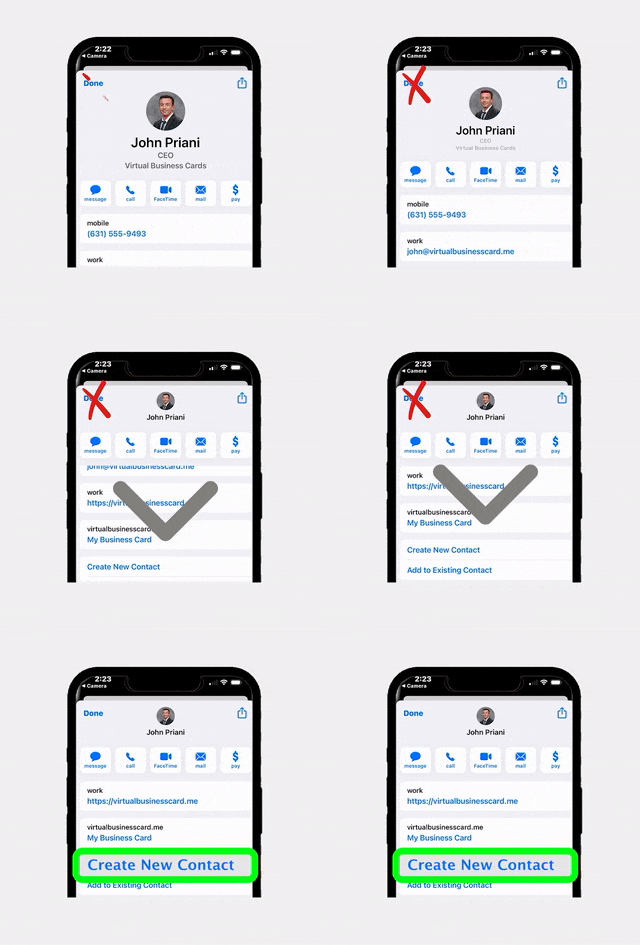
 Icon On The Top Right Is the Menu For Your Card. This Is Where You can edit your card and log into your dashboard.