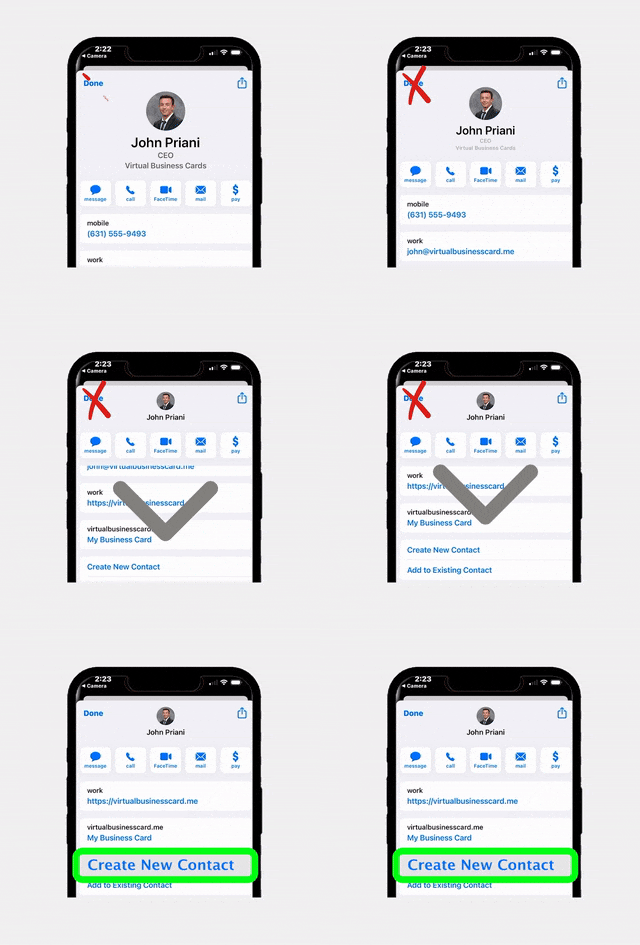
LinkedIn has long been the go-to online networking tool for professionals across every industry, including real estate. But as buyer and seller expectations evolve, many agents are discovering that a purpose-built digital business card delivers far more value than a generic LinkedIn profile ever could. If you are still handing out your LinkedIn URL at open houses, networking events, and client meetings, you may be leaving leads, listing opportunities, and lasting impressions on the table.
The Problem with LinkedIn for Real Estate Networking
There is no denying that LinkedIn is a powerful platform. With over 1 billion members worldwide, it provides massive reach and a credible professional presence. For corporate recruiters, B2B sales teams, and consultants, LinkedIn is a natural fit. But for real estate agents, the platform introduces several friction points that can quietly erode your lead generation efforts.
Generic by design. LinkedIn profiles follow a rigid template. Your headshot, headline, work history, and endorsements look nearly identical to every other agent on the platform. There is no room to showcase your current listings, embed your brokerage branding, or display MLS data in a way that is meaningful to a home buyer or seller.
Distracting environment. When you send someone to your LinkedIn profile, you are also sending them into a feed full of competitor posts, recruiter messages, and unrelated content. According to research from the National Association of Realtors (NAR), the average home buyer’s attention span for evaluating an agent online is remarkably short. Every click away from your personal brand is a click toward someone else’s.
No lead capture mechanism. LinkedIn does not give you a built-in way to capture a prospect’s contact information the moment they view your profile. Sure, they can send a connection request, but that is a far cry from collecting an email address, phone number, or property interest that you can plug directly into your CRM.
What Is a Digital Business Card for Real Estate?
A digital business card is an interactive, mobile-friendly profile page that contains all of your essential contact information, branding, social links, and calls to action in one clean, shareable package. Unlike a static paper card or a LinkedIn URL, a digital business card is purpose-built for making connections and converting them into tangible leads.
For real estate professionals, platforms like RealConnect by RLTRsync take the concept even further. RealConnect cards are designed from the ground up for agents and brokers, which means you get features that LinkedIn simply cannot offer:
- One-tap contact saving directly to a prospect’s phone
- Embedded links to your active listings, virtual tours, and review pages
- Custom brokerage branding with your logo, colors, and headshot
- QR code sharing for in-person events and open houses
- Integration with your existing real estate tech stack
Think of it as your LinkedIn profile, your paper business card, your listing portfolio, and your lead capture form all rolled into one mobile-optimized experience that you fully control.
LinkedIn vs. Digital Business Card: A Side-by-Side Comparison
To understand the practical differences, let us compare the two tools across the criteria that matter most to working real estate agents.
- Branding control: LinkedIn enforces a uniform layout. A digital business card lets you customize colors, logos, headshots, and layout to match your brokerage identity.
- Lead capture: LinkedIn requires a connection request (and often a premium subscription for InMail). A digital business card can collect names, emails, and phone numbers instantly.
- Listing integration: LinkedIn has no native MLS or listing display feature. RealConnect cards can link directly to active listings and virtual tours.
- Sharing speed: Sharing a LinkedIn profile requires the recipient to have a LinkedIn account or navigate a web browser. A digital business card can be shared via QR code, NFC tap, text message, or email in seconds.
- Distraction level: LinkedIn surrounds your profile with competitor content, ads, and notifications. A digital business card keeps the focus entirely on you and your value proposition.
- Analytics: LinkedIn provides limited profile view data. A well-built digital business card platform provides detailed analytics on who viewed your card, which links they clicked, and how they engaged.
- Offline usability: LinkedIn is purely online. A digital business card with a QR code works seamlessly at in-person events, open houses, and conferences.
Key Benefits of Switching to a Digital Business Card
Now that you can see the structural differences, let us dig into the real-world benefits that agents experience after making the switch.
1. You Own the Experience
When a prospect lands on your digital business card, there are no competitor ads, no suggested connections, and no algorithmic feed pulling their attention away. Every element on the page is something you chose to include. This level of control is critical in an industry where personal branding is directly tied to income.
2. Faster Lead Capture at Events
Open houses, broker tours, and networking mixers are goldmines for new leads, but only if you can capture contact details quickly. With a QR code linked to your digital business card, a prospect can scan, save your info, and even submit their own contact details in under ten seconds. If you are already using EntryPointPro for your open house sign-ins, pairing it with a RealConnect card creates a seamless lead capture ecosystem from first handshake to follow-up.
3. Always Up to Date
How many times have you changed brokerages, updated your phone number, or earned a new designation, only to realize hundreds of paper cards with old information are still floating around? A digital business card updates in real time. Change your details once, and every person who saved your card sees the new information instantly.
4. Environmentally Friendly
According to Statista’s print industry research, billions of business cards are printed each year, and a significant percentage end up in the trash within a week. Going digital eliminates paper waste entirely, which is a selling point that resonates with today’s environmentally conscious buyers and sellers.
5. Measurable ROI
One of the biggest frustrations with traditional networking tools, including LinkedIn, is the difficulty of measuring results. A digital business card platform provides analytics dashboards that show you how many people viewed your card, which links they tapped, and how many new contacts you captured over a given period. This data helps you refine your networking strategy and focus your energy on the channels that actually produce business.
How to Set Up Your RealConnect Digital Card
Getting started with RealConnect is straightforward, even if you are not particularly tech-savvy. Here is a step-by-step overview of the setup process.
Step 1: Create Your Account
Visit the RLTRsync platform and select the RealConnect product. You will be prompted to enter basic information like your name, brokerage, and email address. The setup wizard walks you through each field so nothing gets missed.
Step 2: Upload Your Branding Assets
Add your professional headshot, brokerage logo, and brand colors. Consistency matters here. Use the same photo and color scheme that appear on your website, yard signs, and marketing materials so prospects recognize you instantly.
Step 3: Add Your Contact Details and Links
Enter your phone number, email, office address, and any social media profiles you want to include. This is also where you can add direct links to your active listings page, Zillow profile, Google Reviews, and any other resources that strengthen your credibility.
Step 4: Customize Your Call to Action
Every great marketing asset includes a clear next step. RealConnect lets you add a custom call-to-action button, whether that is scheduling a consultation, requesting a home valuation, or signing up for your neighborhood newsletter.
Step 5: Generate and Share Your QR Code
Once your card is complete, RealConnect generates a unique QR code that you can print on marketing materials, add to your email signature, display at open houses, or share in text messages. The QR code links directly to your digital card, so anyone can access it with a simple scan.
When to Share Your Digital Card Instead of LinkedIn
Understanding when to use your digital business card versus your LinkedIn profile is key to maximizing each tool’s strengths. Here are the most common scenarios where your digital card should take priority.
Open Houses and In-Person Events
When you meet someone face to face, speed matters. A QR code scan takes two seconds and delivers your complete professional profile without requiring the other person to have a LinkedIn account. This is especially important at open houses where visitors may be casual browsers who are not active on LinkedIn.
Email Signatures
Your email signature is prime real estate (no pun intended). Instead of linking to LinkedIn, where recipients may get distracted, link to your digital business card. It keeps them focused on your listings, your reviews, and your contact information.
Text Message Follow-Ups
After a showing or initial consultation, sending a quick text with your digital card link is far more effective than saying “connect with me on LinkedIn.” The card gives prospects everything they need, including your phone number, email, listings, and a call-to-action button, without requiring them to log into a separate platform.
Social Media Bios
Instagram, Facebook, and TikTok all offer limited bio link space. Using that precious link for your digital business card instead of LinkedIn ensures that anyone who clicks through lands on a page optimized for real estate engagement, not general professional networking.
Print Materials and Signage
Yard signs, flyers, postcards, and brochure boxes are all ideal places to display your QR code. A prospect driving through a neighborhood can scan your sign, instantly save your contact information, and browse your other listings without ever typing a URL or searching for you on LinkedIn.
Tips for Making a Smooth Transition
Switching from LinkedIn as your primary networking link to a digital business card does not have to be an overnight overhaul. Here are practical tips to make the transition seamless.
Start with your email signature. This is the easiest and highest-impact change you can make. Replace your LinkedIn URL with your digital card link today and you will immediately start directing every email recipient to a more focused, conversion-friendly experience.
Update your social media bios. Swap out LinkedIn links in your Instagram, Facebook, and TikTok bios. This takes less than five minutes per platform and ensures that your social media traffic flows to a page you fully control.
Add your QR code to all print materials. The next time you order business cards, flyers, or postcards, include your digital card QR code. Many agents find it helpful to add a brief instruction like “Scan to save my contact info” so recipients know exactly what to expect.
Brief your team. If you are a team lead or broker, roll out digital business cards across your entire team. Platforms like RLTRsync offer team and brokerage pricing that makes it cost-effective to standardize your branding across every agent in your office.
Track your results. After the first 30 days, review your digital card analytics. How many views did you receive? How many contacts were captured? Which links got the most clicks? Use this data to optimize your card and refine your sharing strategy.
Keep LinkedIn as a secondary channel. Add a link to your LinkedIn profile on your digital business card so that prospects who want to dig deeper into your professional background can still find you there. This way, LinkedIn becomes a supporting asset rather than your primary networking tool.
Frequently Asked Questions
Is a digital business card really better than LinkedIn for real estate agents?
For direct lead generation and client-facing interactions, yes. A digital business card gives you full branding control, instant lead capture, listing integration, and zero distractions from competitors. LinkedIn remains valuable for broader professional networking and industry thought leadership, but it should not be your primary tool for connecting with buyers and sellers.
Do prospects need to download an app to view my digital business card?
No. RealConnect digital business cards are mobile-friendly web pages that open in any smartphone browser. Recipients do not need to download an app, create an account, or have any special software. They simply scan your QR code or click your link and your full profile appears instantly.
Can I include my LinkedIn profile on my digital business card?
Absolutely. Most agents include a LinkedIn icon or link on their digital card as one of several social media links. This way, prospects who want to view your professional background on LinkedIn can still access it, but they arrive at your digital card first where you control the experience.
How much does a digital business card cost compared to printing paper cards?
Digital business cards typically cost a small monthly or annual subscription fee, which is often comparable to or less than a single order of premium printed cards. The key difference is that digital cards never go out of date, never get thrown away, and provide analytics that paper cards cannot. Visit the RLTRsync pricing page for current plan details.
Can I use a digital business card alongside EntryPointPro at open houses?
Yes, and this is one of the most powerful combinations available. Use EntryPointPro for your digital open house sign-in and compliance management, and display your RealConnect QR code so visitors can save your contact information for follow-up. Together, these tools create a complete lead capture and nurturing workflow.
Ready to Upgrade Your Networking Game?
Join thousands of real estate professionals who have switched to RealConnect, the digital business card built specifically for agents and brokers. Stand out, capture more leads, and take control of your personal brand.




 Icon On The Top Right Is the Menu For Your Card. This Is Where You can edit your card and log into your dashboard.