The shift toward paperless real estate is no longer optional. It is a competitive advantage that saves agents hours each week, reduces costly errors, and creates a better experience for clients. From open house sign-in sheets to offer submissions and business cards, nearly every paper-based process in a real estate workflow now has a digital alternative. In this guide, we break down 10 essential tools that help agents and brokers eliminate paper entirely, so you can run a faster, more organized, and more sustainable business.
Why Going Paperless Matters in Real Estate
Real estate has historically been one of the most paper-heavy industries. Between listing agreements, purchase contracts, disclosure forms, inspection reports, and closing documents, a single transaction can generate hundreds of pages. Multiply that across dozens of deals a year, and you are looking at a mountain of paper that needs to be printed, signed, stored, and eventually shredded.
According to the National Association of Realtors, technology adoption among agents continues to accelerate, with more than 90% of firms now using some form of digital tool in their daily operations. The reasons are clear. Paperless workflows reduce overhead costs, minimize compliance risks tied to lost or misfiled documents, and dramatically speed up transaction timelines.
For clients, the benefits are equally compelling. Buyers and sellers increasingly expect digital convenience. They want to sign documents from their phones, receive instant updates, and avoid the hassle of printing and scanning. Agents who deliver that experience stand out from the competition.
1-2. Digital Open House Sign-In Platforms
Open houses are one of the last bastions of clipboard-and-paper workflows. Visitors scribble illegible names and phone numbers, sheets get lost in the car, and follow-up becomes a guessing game. Digital sign-in tools solve every one of these problems.
What to Look For
- QR code check-in so visitors can sign in from their own phones
- Automated lead capture with validated email addresses and phone numbers
- Integration with your CRM for instant follow-up
- Compliance document collection at the point of sign-in
- Broker-level reporting across multiple agents and events
EntryPointPro by RLTRsync is purpose-built for this exact scenario. It replaces paper sign-in sheets with a QR code-based check-in system that captures accurate visitor information, processes compliance documents automatically, and feeds leads directly into your pipeline. No more deciphering handwriting or manually entering contacts after a long Sunday afternoon.
Other notable tools in this category include Spacio and Curb Hero, which also offer tablet-based or phone-based sign-in options. The key is choosing a solution that goes beyond simple data collection and actually automates the follow-up process.
3-4. E-Signature and Document Management Platforms
If there is one category of tools that has done the most to advance paperless real estate, it is e-signature platforms. These tools allow agents to send, sign, and store documents digitally, eliminating the need for printers, scanners, and physical file cabinets.
Top E-Signature Tools for Real Estate
DocuSign remains the industry standard. It integrates with most MLS systems and transaction management platforms, supports mobile signing, and provides audit trails that satisfy legal requirements in all 50 states. The NAR’s guidance on electronic signatures confirms that e-signatures carry the same legal weight as wet signatures under the federal ESIGN Act and state-level UETA laws.
Dotloop is another popular choice, especially among brokerages that want an all-in-one solution. Dotloop combines document editing, e-signatures, and transaction management in a single platform. Agents can create, edit, and share documents without ever leaving the app.
Both platforms offer template libraries for common real estate forms, which further reduces the time spent creating documents from scratch. They also provide cloud storage for completed files, making it easy to retrieve documents months or years later for compliance audits.
5-6. Digital Offer Management Systems
Managing offers is one of the most stressful parts of a listing agent’s job, especially in competitive markets where multiple offers arrive within hours. Paper-based offer management, where agents receive offers via email attachments, fax, or even hand delivery, creates chaos. Important details get buried in email threads, comparison becomes tedious, and the risk of accidentally overlooking an offer is real.
Why You Need a Dedicated Offer Platform
A dedicated offer management system centralizes every offer in one dashboard, making it easy to compare terms side by side, track deadlines, and communicate with all parties. This is a massive upgrade over spreadsheets or email folders.
RLTRsync’s Offer Management platform is designed specifically for real estate agents and brokers who want to bring order to the offer process. It provides a centralized portal where buyer’s agents submit offers in a structured format, listing agents review and compare offers at a glance, and all parties stay informed throughout the process. No more printing out stacks of offers to spread across the kitchen table.
Other tools in this space include Opendoor’s offer tools for iBuyer scenarios and various MLS-integrated platforms. The important thing is to move away from the fragmented email-and-print approach that causes delays and errors.
Benefits of Digital Offer Management
- Side-by-side offer comparison with key terms highlighted
- Automated notifications when new offers arrive or deadlines approach
- Complete audit trail for compliance and dispute resolution
- Reduced bias through standardized presentation of all offers
- Faster response times, which buyers and their agents appreciate
7. Digital Business Cards for Real Estate Professionals
It might seem like a small detail, but business cards represent a surprising amount of waste and inefficiency. Agents order hundreds or thousands of paper cards, many of which end up in the trash. When contact details change, such as a new phone number or brokerage, entire boxes of cards become obsolete overnight.
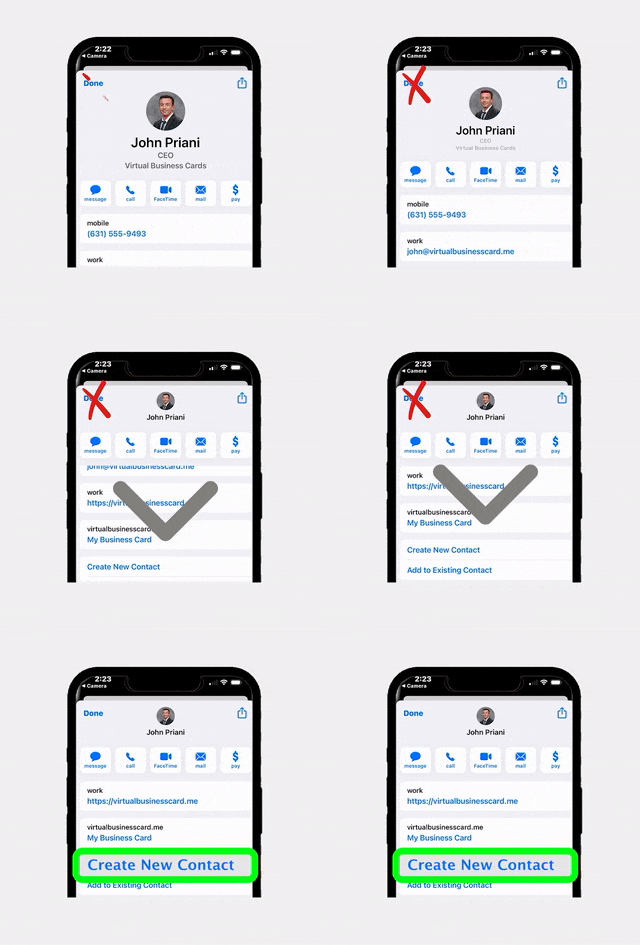
Digital business cards solve this by giving you a single, always-up-to-date card that you can share via NFC tap, QR code, text message, or email. Recipients save your contact information directly to their phone, which means they are far more likely to actually reach out when they need an agent.
RealConnect by RLTRsync is specifically designed for real estate professionals. Unlike generic digital card platforms, RealConnect includes features tailored to agents, such as listing links, brokerage branding, and social media integration. It ensures you always make a professional impression without ever running out of cards or handing someone outdated information.
8-9. Cloud Storage and File Organization Tools
Even when you use e-signatures and digital offer systems, you still need a reliable place to store and organize your files. Cloud storage platforms ensure that every document is accessible from any device, backed up automatically, and easy to share with clients, co-agents, or your brokerage’s compliance team.
Google Drive and Google Workspace
Google Drive is a natural fit for real estate teams because of its generous storage, real-time collaboration features, and seamless integration with Gmail. You can create shared folders for each transaction, give clients view-only access to specific documents, and search across thousands of files in seconds. Google Workspace plans offer additional storage and admin controls for brokerages managing multiple agents.
Dropbox Business
Dropbox Business provides a more file-centric experience with advanced syncing, version history, and granular sharing permissions. Many agents prefer Dropbox for its clean interface and reliable desktop sync, which makes it feel like you are working with local files even though everything is stored in the cloud.
Whichever platform you choose, the key is to establish a consistent folder structure and naming convention. A common approach is to create a top-level folder for each year, subfolders for each transaction by address, and standardized file names like “Purchase_Agreement_123MainSt_v2.pdf.” This simple system makes it easy to find any document months or years later.
10. Accounting and Expense Tracking Tools
The final category of tools that help agents achieve a fully paperless real estate workflow involves financial management. Tracking commissions, expenses, mileage, and marketing costs on paper or in basic spreadsheets is time-consuming and error-prone, especially when tax season arrives.
QuickBooks Self-Employed
QuickBooks Self-Employed is popular among independent agents because it automatically imports bank and credit card transactions, categorizes expenses, and estimates quarterly tax payments. You can photograph receipts with your phone and attach them to transactions, eliminating the need to keep paper receipts.
Expensify
Expensify is an excellent companion for agents who travel frequently or host events. Its receipt scanning feature uses OCR (optical character recognition) to extract amounts, dates, and vendors from photos of receipts. It also supports mileage tracking, which is critical for agents who drive to showings, inspections, and client meetings every day.
According to Inman News, top-producing agents consistently cite financial organization as a key factor in their long-term success. By going digital with your accounting, you not only save time but also gain clearer visibility into your business profitability.
Honorable Mentions
- Wave for agents who want a free accounting tool with invoicing capabilities
- FreshBooks for teams that need time tracking alongside expense management
- MileIQ as a standalone mileage tracker with automatic trip detection
How to Transition Your Brokerage to Paperless
Knowing which tools exist is only half the battle. Successfully transitioning to a paperless real estate workflow requires a deliberate plan, especially if you manage a team or brokerage with established habits.
Step 1: Audit Your Current Paper Usage
Start by listing every process that currently involves paper. Common culprits include open house sign-in sheets, listing presentations, buyer consultation packets, offer documents, closing checklists, and marketing flyers. You may be surprised at how many paper touchpoints exist in a single transaction.
Step 2: Prioritize High-Impact Changes
You do not need to go paperless overnight. Focus first on the processes that consume the most paper or cause the most friction. For most agents, this means starting with e-signatures and digital offer management, then expanding to open house sign-in and document storage.
Step 3: Choose Integrated Tools
The best paperless workflows use tools that integrate with each other. For example, when your digital open house sign-in platform feeds leads directly into your CRM, and your offer management system stores documents in the cloud automatically, you eliminate manual data entry and reduce the chance of errors.
Step 4: Train Your Team
Adoption is the biggest challenge in any technology transition. Schedule training sessions, create quick-reference guides, and designate a tech-savvy team member as a go-to resource for questions. Consider running a pilot program with a few willing agents before rolling out changes to the entire brokerage.
Step 5: Communicate with Clients
Let your clients know that you use digital tools. Most will appreciate the convenience, but some may need a brief explanation of how e-signatures work or why you are using a QR code instead of a paper sign-in sheet. A quick sentence in your initial consultation, such as “We use digital tools to make the process faster and more secure for you,” goes a long way.
Frequently Asked Questions
Is paperless real estate legally compliant?
Yes. The federal ESIGN Act and the Uniform Electronic Transactions Act (UETA), adopted in some form by all 50 states, give electronic signatures and digital documents the same legal standing as their paper counterparts. Always verify specific requirements with your state’s real estate commission, but in general, digital workflows are fully compliant with current regulations.
How much money can agents save by going paperless?
Savings vary depending on transaction volume, but agents commonly report saving $500 to $2,000 per year on printing, paper, ink, postage, and physical storage costs. The time savings are even more significant. Eliminating manual data entry, physical filing, and in-person document exchanges can free up several hours per week.
What if my clients prefer paper documents?
Some clients, particularly those less comfortable with technology, may initially prefer paper. In these cases, you can offer to walk them through the digital process or provide a printed copy as a courtesy while still maintaining digital records as your primary system. Over time, most clients adapt quickly once they experience the convenience.
Do I need to digitize my existing paper files?
It depends on your state’s record retention requirements and how often you need to access old files. For active transactions, digitizing is highly recommended. For archived files nearing the end of their retention period, it may not be worth the effort. A good scanner or scanning app can make the digitization process quick and painless for files you do need to convert.
What is the best first step toward going paperless in real estate?
The highest-impact first step for most agents is adopting an e-signature platform like DocuSign or Dotloop. This single change eliminates the majority of printing and scanning in your daily workflow. From there, add a digital open house sign-in tool and a cloud storage system to cover the remaining paper touchpoints.
Ready to Go Paperless?
RLTRsync offers digital tools built specifically for real estate professionals, from open house sign-in to offer management to digital business cards. Start eliminating paper from your workflow today.






 Icon On The Top Right Is the Menu For Your Card. This Is Where You can edit your card and log into your dashboard.