Nolan Orgonas

Digital Marketing Specialist
Call Me
Email Me
Text Me
Nolan Orgonas
Share by Text
Share By Email
Add To Contacts
  • orgonasdigital@gmail.com
  • 631-604-8965
  • www.orgonasdigital.com
  • Long Island, NY
Facebook Twitter Youtube

Mobile Business Cards Are Not Available On Desktop! Sorry!

Loading...
Forgot Password?
Or
Or
Lost your password? Please enter your username or email address. You will receive a link to create a new password via email.
body::-webkit-scrollbar { width: 7px; } body::-webkit-scrollbar-track { border-radius: 10px; background: #f0f0f0; } body::-webkit-scrollbar-thumb { border-radius: 50px; background: #dfdbdb }

Upgrade To RealConnect Pro

Unlock the tools top agents rely on to impress clients, close faster, and look professional at every touchpoint.

🏷️

Auto‑sync Listings & Past Sales

Instant credibility with live inventory and proof of performance.

⭐

Testimonials & Collect Reviews

Pull reviews from Zillow, Google & more in one click.

📈

Detailed Analytics

Know who’s visiting, what they tap, and what converts.

🎬

Video & Files

Embed listing videos, buyer guides, and disclosures.

Feature
Basic
Pro
Active listings on your card
—
✓
Import past sales
—
✓
Testimonials import
—
✓
Files & video embeds
—
✓
Analytics
—
✓
Trusted by agents at Brokerage 1 Brokerage 2 Brokerage 3
No‑risk: Cancel anytime
$10/mo
Billed annually · Cancel anytime
🔒 Secure 256-bit SSL checkout powered by Stripe
Visa Mastercard Amex
“This made my card look 10× more professional — I signed two new clients that same week.”
– Sarah M., Compass

Getting Started With Your Digital Card

This popup will load every time you load your card until you click the box below. We suggest you keep this until you are familiar with your card.

First Lets Finish Setting Up Your Card

Edit Card

Next, Lets Read The Tips On Using Your Card

  • The Icon On The Top Right Is the Menu For Your Card. This Is Where You can edit your card and log into your dashboard.
  • You Can Edit ALL information on your card from the card from the Editor.
  • Click Share My Card To View Your QR code and other sharing options for your card
  • Click Add To Homescreen or click here for instructions on Saving your card as an app icon on your phone
  • The Buy/Sell Forms Are For Clients to send you their information. Their contact info can be found in the dashboard.
  • Share Your QR code Everywhere you can. the more visibility the more clients can find you.
  • Active Listings, Past Sales, And Testimonials will be pulled from Zillow. Make sure you link your account and click the sync buttons in the editor.
Close Popup (Popup will Reopen next time you load card)
Close Popup and Do Not Show Again. I am familiar with my new digital card.

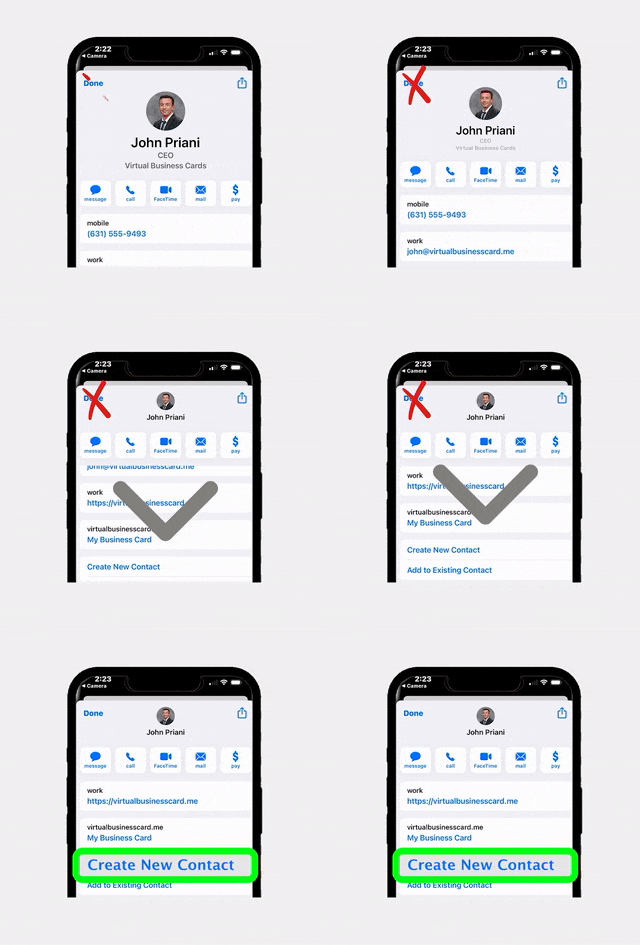
Scroll down to

Create New Contact

Save To Contacts

Social Browser Warning

The add to contacts feature is not available on in-app browsers (Instagram/Snapchat). Please open the card on your phones browser (safari, chrome) to download my contact.

Browser Not Supported!

Menu

Products

  • EntryPoint pro
  • RealConnect Pro
  • Offer Management

COMPANY

  • Pricing
  • Shop
  • Help
  • Company Orders
  • Blog
  • Dashboard

Insert/edit link

Enter the destination URL

Or link to existing content

    No search term specified. Showing recent items. Search or use up and down arrow keys to select an item.